
FSC Link
For X-Plane 11/12 on Intel Mac and Linux. Download the standalone plugin for your session.
About
FSC Link connects X-Plane to Flight Sim Coach so your instructor can monitor session data and use the controls supported by your simulator. Follow the installation steps below after downloading the plugin.
Apple-silicon Macs are not supported. Neither FSC Hub nor this FSC Link plugin currently supports them.
Install FSC Link
X-Plane for Mac or Linux
Version 1.53
Compatible with X-Plane 11/12 on Intel Mac and Linux. The plugin also runs on Windows, where FSC Hub is the usual choice for sessions.
Instructions
- Download and unzip
- Copy the inner “Flight Sim Coach” folder into your X-Plane 11/Resources/plugins folder
- Start your simulator
Notes
- If you’re practicing ATC with your instructor or at a group event, fill in your callsign and aircraft type by going to the X-Plane plugins menu, then FSC Link, then Settings
- The application will transmit parameters to our server anytime X-Plane is running. We recommend disabling the plugin via the plugin menu when you are not actively receiving remote coaching.
On Windows? Get FSC Hub for your session. If your instructor or FSC support asks you to use the older FSC Link utility, open the section below.
Need the older Windows MSFS utility?
For a new session on Windows, use FSC Hub. Keep this utility only when your instructor or FSC support asks you to use the older connection.
Instructions
- Download and unzip to a convenient location
- To start the utility, open the unzipped folder and double click FSC Link.exe
- Start your simulator
Notes
- If you’re practicing ATC with your instructor or at a group event, fill in your callsign and aircraft type by clicking the FSC icon in your Windows system tray
- The utility can also be started after you load MSFS (in case you forget to start the utility beforehand)
- Do not click the .application file; you must click the .exe file
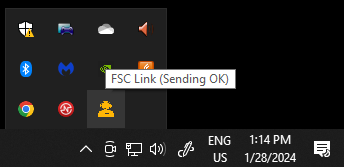
- There’s nothing that will pop up after clicking the .exe; you just have to look in your system tray to see if the FSC symbol is there and showing Sending OK status (while your sim is running)
FAQ
What information is sent to the FSC servers?
The following information is transmitted from your simulator:
- Aileron
- Aileron Trim
- Elevator
- Elevator Trim
- Rudder
- Rudder Trim
- RPM
- Flaps
- Angle of Attack
- Sideslip Angle
- Latitude
- Longitude
- Altitude (MSL)
- Ground Speed
- Heading
- Track
- Flight Path Angle
- Mixture
- Wind Direction
- Wind Speed
- Brake (Left)
- Brake (Right)
- Aircraft type (user-input)
- Callsign (user-input)
- IP address
What can the instructor control on my computer?
Currently, our instructors will be able to control the following:
- MSFS – failures: Engine failure
- X-Plane – failures: Engine failure, engine fire, vacuum system failure, flap failure, throttle stuck at full/max, pitot/static blockages, airspeed/attitude/DG failures, GPS failures, AHRS failures
- X-Plane – environmental conditions: Wind, wind shear, turbulence, clouds, visibility, precipitation, temperature/pressure
- X-Plane – other: Pause
Is any of my flight data stored on the FSC server?
No, we do not store the transmitted data on our server.


